
Lesson 1.3 - Describing a Quantitative Variable

Key Question: Why would anyone make (or watch) a movie about the Oakland A's?
Content: Dotplots | Histograms | Describing Distributions
Video
See the video on YouTube.
Course Resources
Resources for teaching our High School Statistics curriculum.
- Lesson Flow - timing and flow of class, using our lesson materials
- Pacing Guide - pacing our units, with daily or block schedules
- Alignment Guide - aligning our lessons to national and state standards for high school statistics
- Classroom Routines - a guidebook of classroom routines embedded within our lessons
Teaching Resources
Resources for teaching with Skew The Script.
- Discussion Norms - our model discussion norms for the classroom
- Letter to Parents - letter to share with parents about our nonpartisan approach
- Teaching Math on Civic Topics - tips for teaching math lessons that cover civic topics
Lesson Notes
Lesson-specific insights from the creators of this lesson.

This lesson explores some of the data behind every statisticians’ favorite movie: Moneyball. Specifically, students analyze the distribution of baseball team payrolls – and the wide spread between them – that made the Oakland A’s 2002 playoff run so special. The movie and the story behind it provides the perfect context for motivating the need to visualize and describe quantitative data. Plus, we always love an excuse to watch more clips of Brad Pitt 😊. Students may recognize some of the graph types in this lesson from prior courses. In this course, they make sense of their applications and usefulness in new ways, discovering that not all representations are the same (even when they look similar).
- Interpret dotplots and histograms
- Describe the center, shape, and spread of a quantitative variable
In the last lesson, students worked with categorical variables. As they now focus on quantitative variables, the distinction between categorical and quantitative data (and the way each is represented) is a key idea to highlight. Knowing when to use a bar chart rather than a histogram matters, and so does recognizing what information they can offer. This lesson lays the groundwork for future lessons in which students will visualize multiple quantitative variables and evaluate the tradeoffs between different ways of representing them. By the end of the lesson, students will not only have engaged with various representations of data, but they’ll also be able to informally describe the shape, center, and spread of data. The remaining lessons of this unit focus on making these descriptions of data more specific and precise.
Before proceeding: Familiarize yourself with the lesson materials linked above (e.g. handout, handout key, slides, video). Then, for additional background and teaching tips from the lesson creators, check out the sections below.
- When playing the initial clip of Brad Pitt (“There are rich teams and there are poor teams. Then there’s 50 feet of crap. And then there’s us.”), pause to have students consider how player talent may vary between the rich teams and the poor teams – and whether that’s “fair” in their eyes. This helps motivate the analysis of the distribution of team payrolls throughout the lesson.
- This lesson also introduces the Big Picture - Closer Look - Zooming In strategy to describe a distribution. It is not designed to be a checklist, but rather a framework that students can use in a wide variety of situations to describe what they see or conclusions they make. Describing it as a way to organize their thinking, like a funnel for their analysis, may support this perspective. The icons associated with each part of the framework (as seen in the lesson slide deck and video) are also listed on the lesson handout. Students should not limit their responses to align with the icons. Instead, the intent behind the icons is to help them to gradually narrow their thinking.
- Consistent reinforcement of key features of graphs, such as title, axis labels, and axis scale, will prompt students to be mindful of these necessary features when reading or creating graphs.
- The exact minimum and maximum values are not visible in a histogram. So, in the guided notes, students describe the spread for a histogram as the distance between the lowest bin of values and highest bin of values. Advise students that for dotplots – where the exact minimum and maximum data values are visible – they should report the spread as the distance between the minimum and maximum.
- Students will not see the term 'outlier' until lesson 1.6, but they may informally recognize extreme values in the data. If the term surfaces organically, recognize it with the qualification that they will define it more precisely later.
First, download this lesson's slide deck and handout key to see the prompt and sample responses for the Lesson Starter. Then, check out the additional background notes below.
Instructional routine: Notice & Wonder. The lesson handout provides a Notice & Wonder T-frame for students to capture their notes and ideas. It is important that students recognize the difference between a noticing (observation) and a wondering (question that comes to mind). You can find more background on implementing a Notice & Wonder here.
Purpose & Background: The goal of this Lesson Starter is to get students to recognize extreme variation and call it out. The prompt introduces students to the dataset that they will explore throughout the lesson. Without the context of Moneyball that will frame the learning, they may be more likely to hone in on the disparities in payrolls and what they might mean. The recognition of the Yankees as the best resourced team will likely come from a student Noticing and will position students to appreciate the challenges of the A’s when their story comes into play. Seeing the whole dataset will also provide the broader perspective necessary for the lesson’s Discussion Question.
First, download this lesson's handout key and read through its Discussion Question section. Then, check out our model discussion norms and the additional background notes below.
- For part (b) of the Discussion Question, another point that the “yes” side might raise: if a team is consistently not competitive, their fan base will get tired of seeing the losses and will tune out. For the fandom of the sport to thrive, you’d want as many teams as possible to be competitive. Making team payrolls more equal helps this outcome.
- To help students visualize the distribution before and after the luxury tax, you can use these extra slides: ppt, pdf.
- While embedded in baseball, the story of this lesson is more about the ‘haves’ and the ‘have nots’. No understanding of the game is actually required to dive deeply into the context of the lesson. While some students may be excited to see the context, assure students who don’t follow baseball that they, too, will find the overall investigation interesting.
- To help students make connections between payrolls and team quality throughout the lesson, ask them early in the lesson: “Which teams would you expect to get the best players? Why?”
- The field of statistical analysis for baseball is called sabermetrics, named for the Society of American Baseball Research (SABR). The movie Moneyball helped popularize sabermetrics, and it has grown into a deep field of research and study. The second movie clip in the lesson gives motivation for sabermetrics, displays some real sabermetric formulas, and mentions Bill James – a famous early pioneer of sports statistics. Of course, students do not need to know anything about sabermetrics to fully participate in the lesson. But it’s a great first look for students interested in exploring the field of sports statistics as a career.
- For practicing data scientists, one of the first steps of any analysis process (after retrieving and cleaning data) is visualizing data. Because models can be heavily influenced by undetected skewness or unexpectedly wide spread, going straight into calculations or model building before “getting to know the data” by visualizing and exploring it can lead to missteps. This step of visualizing and exploring data is sometimes called Exploratory Data Analysis or EDA.
- Stem-and-leaf plots were especially useful in the pre-computer era. However, they aren’t used in the field much anymore, and we have excluded them from this course. For small data sets, dotplots are most common. For larger data sets, histograms and boxplots (covered in a later lesson) are most common.
Student Supports
Lesson-specific resources to support all learners.
- When reading histograms, students may confuse values and frequencies, inferring that the highest bars represent the highest data values. The highest bars actually represent the most frequent values – not necessarily the largest values. To help make this distinction, ask students, “Which team has the highest payroll in the team payroll dataset?” (it’s the Yankees). Then ask students to point to the histogram bin that contains that team. Then ask them, “Is this bin the tallest one on the graph? Why would the highest payroll team not be in the tallest bin?”
- This lesson utilizes the concepts and language of inequalities. While students have seen strict and inclusive inequalities since middle school, they may not have developed conceptual understanding of the differences between them; solidifying their understanding of inclusive and exclusive boundaries may take more time and discussion.
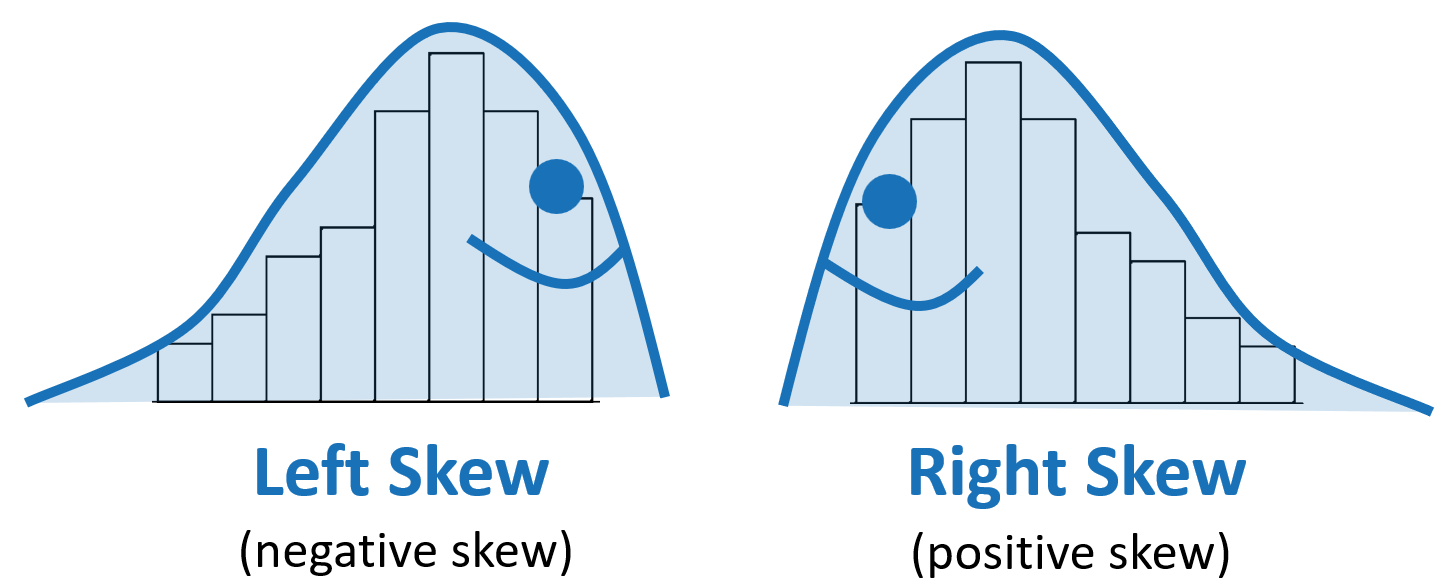
- To help with determining left vs right skew, have students “draw the slug.” The tail of the slug points in the direction of the skew. See example here:
-
Mathematical Language Routines useful for this lesson:
Collect and Display (MLR2) –
- As students progress through the lesson, capture their language and strategies in relation to describing a distribution. Add to this collection throughout the remaining lessons, when applicable.
- The context of baseball will be revisited later in the course. Starting a class collection of baseball-related terms may be helpful for easy access the next time students encounter a baseball-related lesson.
-
Vocabulary used in the context of the lesson may include words that are unfamiliar or have several meanings. In particular, the following mathematical terms may need clarification or a definition provided:
- Dotplot
- Stem-and-leaf plot
- Histogram
- Intervals (bins)
- Shape
- Mode
- Uniform
- Unimodal
- Bimodal
- Left skew (negative skew)
- Symmetric
- Right skew (positive skew)
- Spread
- Range
- Center
-
In addition, the following contextual terms may need clarification or a definition provided:
- Payroll
- Students will not see the term 'outlier' until lesson 1.6, but they may informally recognize extreme values in the data. If the term surfaces organically, recognize it with the qualification that they will define it more precisely later.